 Virtual tours for remarkable stays
StayPano · Insights & guides
360 Tours for Museums and Exhibitions
A 360 tour for museums and exhibitions: visitors preview the halls, exhibition zones and highlight pieces before visiting, and revisit them after the exhibition closes.
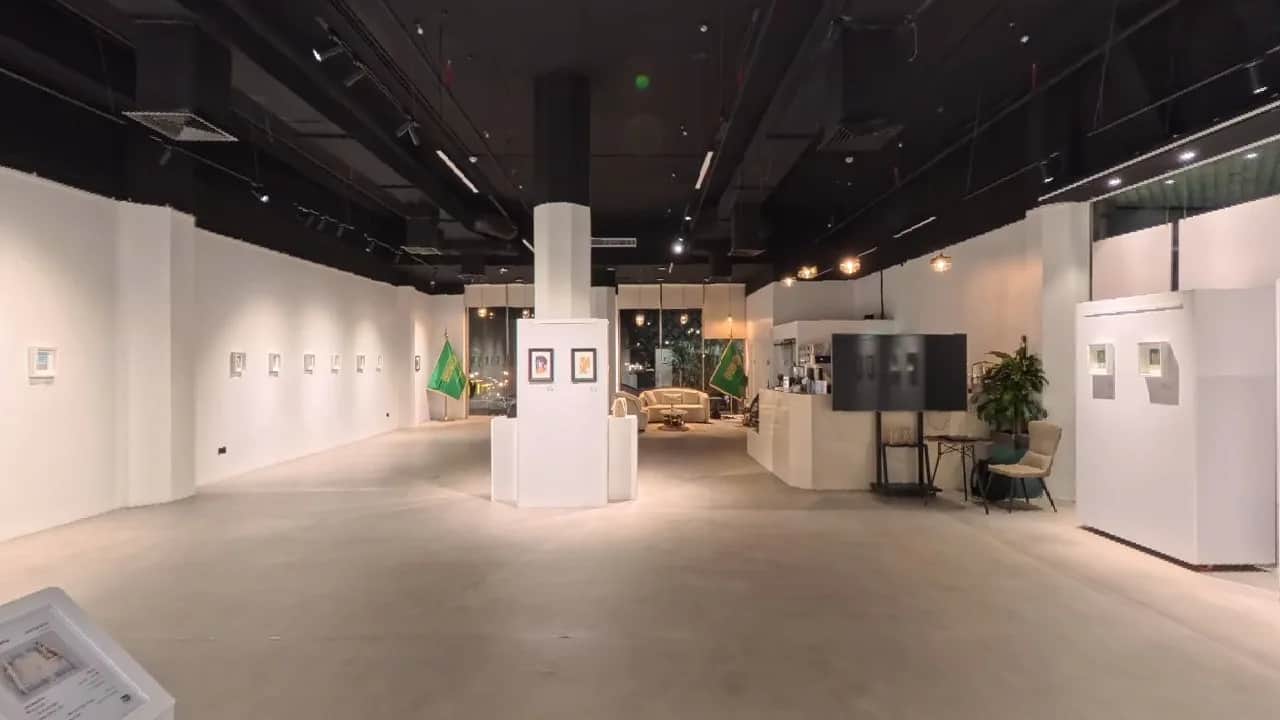
360 Tours for Museums and Exhibitions: Preview Before Visiting, Revisit After It Closes
When deciding whether to visit a museum or an exhibition, people usually have only a few promotional photos and a short description to go on. Good photos still do not show how large the exhibition is, how the zones connect, whether there are places to sit, or whether the route is easy to follow. For visitors coming from far away, or visiting with elderly people or small children, those questions are enough to make them hesitate.
A 360 tour puts visitors in the middle of the exhibition space, free to look around each zone and walk from the lobby through the exhibition rooms in the actual visiting order. Previewing this way, visitors know what they will see, which way to go, and whether they want to come in person. And once the exhibition has closed, that same tour becomes a place to revisit — a form of archive that scattered still photos struggle to provide.
This guide is for museum managers and exhibition organisers considering a 360 tour: which scenes to include, what information to attach, and the copyright notes that must not be skipped.
Visitors decide from the "preview"
For museums and exhibitions, the decision to visit often comes from a feeling about the space, not only from the names of the pieces. A 360 tour lets visitors preview three things still photos struggle to show at once:
- Scale and layout: how many zones the exhibition has, how large each one is, and how the zones connect in sequence.
- Where the highlights are: where the main display zone sits, how the standout pieces are placed, whether there is an interactive zone or a screening room.
- The real experience: whether walkways are spacious, whether there are seats to rest between zones, what the lighting inside the display rooms is like.
This information does not replace visiting in person — seeing a real piece still differs from seeing it on a screen. But it helps visitors prepare: who to go with, how much time to allow, which zone to start from. For a short exhibition, a preview also helps visitors decide faster, before the display period ends.
5 scene groups for an exhibition 360 tour
1. Lobby and entrance
The opening scene shows visitors the exhibition title board, the ticket or information desk, and the entrance to the display area — exactly what they will look for on arrival. For a large museum, the opening scene should also show the main lobby and a map of the zones, so visitors can orient themselves before going deeper.
2. One viewpoint per themed zone
Each exhibition zone deserves its own viewpoint, following the visiting order the organisers arranged. Tour viewers will walk that whole route themselves: from the opening zone, through the themed zones, to the closing zone. Do not merge several zones into a single viewpoint — visitors will struggle to picture how the exhibition is organised.
3. Highlight pieces in close-up
Each zone should have one or a few close-up viewpoints of its most prominent piece or group of pieces. This is the part visitors care about most when previewing, because it shows in concrete terms what is "worth coming to see", not just the general space. Only film pieces according to the museum's rules and the rules of any lending institution (if applicable) — some pieces may not be photographed, and those rules must be respected absolutely.
4. Interactive zones, screening rooms and rest areas
If the exhibition has an interactive zone, a short film screening area, a reading area or seats to rest, include them in the tour. These zones are often the reason visitors stay longer, and they are also what visitors with small children or elderly companions care about most when deciding whether to come.
5. Gift shop and exit
The end of the visiting route: the gift shop (if any), the information desk and the exit. This is also a natural place for a contact point — visitors have seen the whole tour and are most likely to ask about opening hours, tickets or the next exhibition.
You can see a layout reference on the museum and exhibition 360 demo project page — an illustrative demo, not a real client project.
Which info points belong in the tour?
Info points (hotspots) are the tappable points inside a tour. For museums and exhibitions, three kinds are most useful:
- Piece captions: tap to see the piece name and a short caption — name, material, date or context, depending on the information the museum has published. Only state what has been verified from the museum's own material; do not guess further.
- Audio and video illustrations: if the museum already has audio guides or short introductory videos for a piece, they can be attached to that exact point in the tour so visitors can watch and listen together. Only use material the organisers have the right to use.
- Navigation points: scene-change arrows at walkways, so visitors can "walk" onward in the correct visiting order instead of guessing.
How info points work in general is explained in our guide on what hotspots are in a 360 tour. The general rule still holds: only a few genuinely needed points per scene — a tour crowded with buttons makes visitors tap none of them.
The tour keeps its value after the exhibition closes
This is the biggest difference between exhibition tours and tours for other industries: exhibitions have an end date, tours stay.
- Revisit after visiting: visitors who came can reopen the tour to recall the zones, look again at pieces they liked, or send the link to someone who did not make it in time.
- Archive for next time: organisers can keep the tour as a display record — how zones were laid out, how pieces were placed, what the visiting route was — to consult when planning the next exhibition.
- Introduce from afar: for distant visitors who could not come in time, the tour is the only way to "walk" that exhibition, even if only on a screen.
So when building an exhibition tour, film with archiving in mind: cover every zone in the correct order, including layout details that promotional photos usually skip. A rushed tour with missing zones will not be enough to revisit later.
Copyright notes: only use images you have the right to use
This part must not be taken lightly when building tours for museums and exhibitions:
- Piece photos: some pieces are subject to copyright, lender rights, or the museum's no-photography rules. Only film and include pieces that have been cleared.
- Attached material: audio guides, videos, caption texts — only use material the organisers have the right to use, or material the organisers produced themselves.
- Visitor photos: if filming while the exhibition is open, visitors may appear in frame. Film when there are no visitors, or during a dedicated photography session, to avoid using other people's images without consent.
The simple rule: the tour contains only what the organisers have the right to show. Anything with unclear rights stays out of the tour; do not wait until a problem surfaces to remove it.
What to prepare before the tour is built
StayPano builds tours from your existing 360 photos — you send the photos, StayPano checks them, builds the tour, and hands over the tour link plus a website embed code. Before sending photos, organisers should:
- Finalise the visiting route and the list of zones to film, in the exact order visitors walk in real life.
- Review photography rights for every piece and every zone, noting clearly which pieces must not be filmed so the photographer avoids them.
- Pick a filming time with no visitors present, so photos are clean and free of other people's images.
- Prepare info point content — verified piece names and short captions — and note which zones should carry audio or video illustrations.
If you do not have 360 photos yet, you can work with a suitable photographer and send the photos over — StayPano focuses on building the tour and does not include photography.
Key takeaways
A museum or exhibition 360 tour does not need to be grand: a clear lobby, a viewpoint for each zone in the correct order, highlight pieces captioned from verified material, and everything in the tour cleared for showing. Get those right and visitors can preview before deciding to come — and revisit after the exhibition has closed.
Already have 360 photos of your exhibition space? Send them via Zalo and StayPano will check them and advise on the build: Chat on Zalo